Saturday, March 31, 2007

Alienware Area-51 m5550


Alienware Area-51 m5550 is one of the first company’s laptops to feature new Intel Core 2 Duo Merom processor and one of the first Merom-powered notebooks reviewed by PC Magazine and Notebook Review.

Older Yonah Core Duos are no more an option when configuring the m5550, so you can choose one of five Merom processors. The cheapest among them is Core 2 Duo T5500, which is included in the Area-51 m5550 basic price of $999 after $100 instant rebate. The basic Alienware Area-51 m5550 configuration with mid-range Core 2 Duo T7200 costs $1249 after $100 off, while its basic price with top of the line Merom T7600 CPU is $1699 after rebate.

The 15.4 inch screen Alienware Area-51 m5550 is based on Alienware Intel 945PM + ICH7 chipset and it features 512MB, 1GB or 2GB DDR2 memory and a SATA hard drive with storage capacity from 60GB to 160GB. Regarding graphics, you can choose ATI Mobility Radeon X1400 with 128MB memory or NVidia GeForce Go 7600 with 256MB memory for additional $200. The m5550 has Internal Intel PRO Wireless 3945 a/b/g Mini-Card and a combo box optical drive or DVD burner.

The Area-51 m5550 still comes with Windows XP Home, Pro or Media Center Edition.

BenQ Joybook T31


The next-generation BenQ Joybook T31 uses all-new AMD Turion™ 64 X2 Mobile Technology, a breakthrough that brings dramatic performance increases. The Joybook T31 is equipped with 1.3 megapixel QEye webcam, perfect for video conferencing, or just to provide friends with a live broadcast of what’s going on in your life. And the exclusive QShot hotkey lets you easily capture a screenshot from a movie.

Even better, the 13.3"wide-screen display gives you a full 220 nit of brightness, for absolutely captivating viewing. The SRS cinema-class 360-degree surround-sound audio with TruBass bass booster will make you feel you are listening to a live performance.

With the BenQ Joybook T31, you can enjoy a rich sensory experience whether you're working or playing.

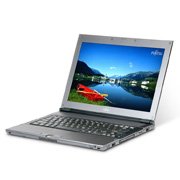
Fujitsu LifeBook Q2010


The LifeBook Q2010 notebook is designed for mobile professionals with a discerning eye for the perfect synthesis of form, function, and style. As the slimmest and lightest 12.1" notebook on the market, its durability, Intel Centrino Mobile Technology, advanced connectivity, and security features assure that you sacrifice nothing for its sophisticated style.
Fujitsu LifeBook Q2010 - Core Solo U1400 / 1.2 GHz - Centrino - RAM : 512 MB - HD : 30 GB - Gigabit Ethernet - WLAN : 802.11a/b/g - TPM - fingerprint - Win XP Pro - 12.1" Widescreen TFT 1280 x 800 ( WXGA )

Fujitsu LifeBook Q2010 - Core Solo U1400 / 1.2 GHz - Centrino - RAM : 512 MB - HD : 30 GB - Gigabit Ethernet - WLAN : 802.11a/b/g - TPM - fingerprint - Win XP Pro - 12.1" Widescreen TFT 1280 x 800 ( WXGA )

Monday, March 26, 2007

Apple's 802.11n software now available

Apple on Tuesday released the software needed to unlock the fast Wi-Fi chips inside almost every one of its new Macs.

At Macworld earlier this month, CEO Steve Jobs revealed that certain Macs were shipped with a fast 802.11n chip inside, but the chip was disabled until the standard was more complete. The company subsequently said it would charge US$1.99 to unlock that capability, or Mac users could buy a new 802.11n Airport Extreme Base Station with the needed software.

Both products are now available, because the industry is more comfortable with the current draft of the standard, said David Moody, vice president of worldwide Mac product marketing. The software enabler can be purchased from the Apple Store, and the US$179 base station is also available online. It should show up in Apple stores over the next few days, the company said.

Based on Apple's tests, the 802.11n standard should allow connection speeds five times faster than 802.11g networks with twice the range, said Jai Chulani, senior product manager at Apple. The company tested the performance of its notebooks connected to its Airport Extreme base station to come up with those numbers, so results may vary in mixed environments. But as long as you have 802.11n on both sides of the connection, any vendor's products will deliver better results than 802.11g networks because of the MIMO (multiple in, multiple out) antenna technology used by the standard.

Apple's 802.11n upgrade fee provoked a controversy after the company claimed it was required by accounting rules to charge users for the software enabler. Accounting experts later clarified that Apple was forced to surprise users with the charge because it booked all the revenue upfront from sales of the Macs with the 802.11n chips, and because it didn't tell users at the time of purchase that they would need to spend US$1.99 to unlock that chip.

The company is getting the software out a little earlier than promised, however. Jobs said at Macworld that the software would ship in February. All Mac notebooks with Intel's Core 2 Duo chip have the 802.11n chip. Mac Pro desktops with the Airport Extreme option and all the iMac models -- except for the entry-level iMac with a 1.83GHz Core 2 Duo chip -- also come with the faster Wi-Fi chip.

Other companies have released notebooks with 802.11n chips, such as Lenovo, Dell and Gateway, but Apple has the technology inside all of its notebooks available now, a company representative said.

The Wi-Fi Alliance is expected to start certifying products based on the 802.11n draft standard relatively soon. A final version of the standard is expected to become available later this year, and current products will likely -- but not definitely -- only require a software update to comply with the final standard, Chulani said.

Promiscuous laptops

Laptops now outsell desktops, and more and more locations are offering free public Wi-Fi networks. Yet there are no formal recommendations on how one should secure a laptop on a public wireless network. Here's an attempt to formalise some best practices.

Laptops now outsell desktops, and more and more locations are offering free public Wi-Fi networks. Yet there are no formal recommendations on how one should secure a wireless laptop on a public wireless network. Case in point: A few weeks ago, I attended the RSA Conference 2007 and shortly afterward saw a press release from AirDefense.net regarding the number of laptops -- at a security conference, mind you -- that weren't connecting to the official public wireless network. What's interesting is that most of the wireless laptop security information I've seen is at best vague, including some of my own tips. Here's my take on some known problems with wireless laptop security and some suggested solutions. I welcome any other tips you might have.

The threats are out there
Two years ago I wrote about "evil twin attacks," in which someone places a more powerful wireless access point close to your laptop, causing it to connect to them rather than to the intended access point. Now all your personal data is flowing through the rogue access point laptop before it accesses the Internet in what's called a man-in-the-middle attack. I mentioned last week that there's now the possibility of mobile devices such as smart phones also conducting evil twin attacks, so we might see more of these in the near future.

Last year, WhiteHat security expert Mark Loveless, aka Simple Nomad, disclosed a problem with Windows XP wireless connections; it seems that Windows XP had a habit of broadcasting a list of known access points that it had connected to in the past. This would, theoretically, allow a criminal hacker to receive that broadcast and configure his or her rogue access point accordingly. Microsoft has since issued a partial fix, in which it turned off the broadcast portion, but maintained the internal automatic connection list. That's still a problem. If you connect at home to a router that's called Linksys, then take your laptop out in public, it will connect to the first access point it finds calling itself Linksys, criminal or otherwise.

Good behaviour counts
By and large, security experts, including myself, are all on record stressing that good behaviour in public places matters most. The surfing that you do online in a public wireless environment should not be what you surf at home on a much more secured wired connection. For example, don't check your bank balance online, or type in your credit card to order flowers online while sitting in an Internet cafe.

What is considered safe are Virtual Private Networks (VPN) tunnels into a corporate environment. VPN encrypts the data back and forth, so that even if a criminal hacker were eavesdropping, they would have to first break the encryption to get the data -- and who has time for that when the guy across the room isn't using VPN? But even this isn't totally secure, as criminals could capture your clear user ID, then decrypt your password access to the VPN; most companies use one of a handful of VPN services that are well-known to criminal masterminds.

Some suggestions
The problem is that Microsoft designed Windows XP and Windows Vista to be convenient, especially when connecting via wireless, but convenience in the security world often carries a high price. Of course, it goes almost without saying that you should always have a suite of security apps including antivirus, antispam, and antispyware, as well as a personal firewall installed on your laptop. But to avoid having your promiscuous laptop connect to the first access point that looks attractive, try these manoeuvres:

* Use a wireless broadband card
Rather than use a public cafe's open wireless, get a wireless broadband account and use your laptop to connect via cell modem. Overall wireless broadband accounts are more secure -- it's harder to hack into a cellular call -- and, in some cases, more reliable than public 802.11 wireless.

* Change your home or office default router name
Don't make your laptop vulnerable in the first place. To do this, access your home or office router's firmware (usually this requires typing a specific address into a browser's address bar), then change the default SSID (Linksys, D-Link, Netgear, or the like) to something original (for example, UpUpAndBeyond, or something similar). While you're at it, change the router's default admin ID and password, and enable some form of encryption (WEP, WPA, or WPA2).

* Disable the Windows networking automatic connect feature
Don't let your laptop connect just anywhere. To do so, right-click your current wireless network connection, click Properties, then click the Wireless Networks tab. Here you'll see a box with all of the last known connections you've made. After each, if it says "automatic", highlight and click properties, then select the connection tab for that network. Uncheck the box labelled "Connect when this network is in range".

The downside is that the next time you fire up your laptop, you won't be connected right away. Instead, you should see a list of available wireless networks. It'll cost you a few seconds to choose one and connect to the right network, but at least you'll know what you're connecting to.

* Set a MAC address for the routers you know
This won't help with random, open public wireless networks the physical address of which you won't necessarily know, but it will help with home and office connections, particularly if you live or work in a crowded area. Again, if you haven't changed your SSID, how do you know if the Linksys router you're connecting to from the front of your apartment is the one in the back of your apartment, or your neighbour's next door?

* Turn off the ad hoc connections option
This should already be disabled with most default Windows XP and Vista installations, but you should check anyway.

Toshiba Qosmio G30 (HD DVD Edition)


Weighing in at 4.5kg and with dimensions of 406mm by 295mm by 44.7mm (50.5 mm counting its rubberised feet), the G30 is undoubtedly one of the bulkiest notebooks currently on the market. Even for a desktop replacement, it's heftier than we're used to. This should be a non-issue for most potential buyers, however.

The notebook has been designed from the ground up with home entertainment in mind. Just above the keyboard is a set of multimedia quick-launch buttons, including one to launch your TV viewing application and another for recording shows on the fly. To the right of the arrow keys lies a volume adjustment wheel, which we found to be handy despite the fact that we would've preferred it to be a little more sensitive (you'll need a full revolution just to increase volume by one notch).

Like Toshiba's Satellite Pro P100, the touchpad doubles as a bay of quick launch buttons for easy access to your most-used applications. This is designed for those using an external mouse, as in these cases the touch pad usually remains idle. Switching between the two modes is done at the tap of a button, and assigning applications to the three customisable buttons is painless.

Toshiba's Qosmio G30 is being pitched as a "four-in-one entertainment unit", which symbolises its four main functions -- television, stereo audio player, HD DVD player and notebook PC.

As expected from such a high-end multimedia device, the notebook's features serve the aforementioned functions well. First off, there's a high-definition DVB-T TV tuner for watching and recording digital television. This tuner also supports analog streams should you be living in an area without digital reception.

Of course, the G30's standout feature is its HD DVD drive. For the uninitiated, HD DVD is one of the two next-generation DVD formats currently fighting it out to replace regular DVD discs (more information can be found here). The key attraction boasted by both formats is their increased capacity (Blu-ray currently comes in 25GB and 50GB flavours; HD DVD in 15GB and 30GB), enabling the storage and playback of high-definition movies at full resolution. The drive can't write to HD DVD discs, but it's able to both read and write DVD and CD discs, including dual-layer and DVD-RAM.

Sony VAIO VGN-AR18GP


A fact that buyers of entertainment-focused notebooks will have to live with for some time yet is low battery life and hefty dimensions. The AR18GP measures in at 416mm by 299.5mm by 33.5-41.5mm and weighs 3.8kg, so you won't be carting it around a great deal.

Nevertheless, the notebook will look great on your desk with its black chassis and chrome trimmings. If Darth Vader was recreated in notebook form, we imagine he'd look something like the AR18GP -- black, bulky and bearing significant grunt.

The chrome trimmings aren't just there to look good, however. They flip down to reveal all of the notebook's ports, which we feel is a great aesthetic touch and makes the unit more akin to something out of the home theatre realm than the beige PC jungle.

Just above the keyboard is a row of handy shortcut keys for navigating your audio/video tracks, while to the left of the keyboard lies volume controls, mute, disc eject and two additional user definable buttons. We found these to be extremely handy during DVD playback, as you're not forced to interrupt viewing in order to adjust settings.

Features
While Blu-ray content is still thin on the ground down under, the Blu-ray disc drive featured on the AR18GP will be highly attractive to content producers, since it provides them with the ability to store and share their home movies recorded on a HD camcorder. Until now, the only way to share this content has been through a portable storage solution, since the current DVD standard's low 4.7GB capacity (8.5GB for dual-layer discs) isn't close to being adequate.

Acer Aspire 5675WLHi


Design
It's not ugly, but it must be said that the 5675WLHi doesn't have anything on the Toshiba and Sony competition in the looks department. When opened up, the glossy display and screen border is a stark contrast to the bland grey/black main shell, and the grey lid won't exactly caress your eyeballs either.

Function clearly takes precedent over form, as the layout of ports, buttons and connectors is superb. Down front, from left to right, lies an Infrared port, power/battery indicators, a line-in jack for connecting audio devices, a microphone jack, a headphone jack (with digital S/PDIF support), a 5-in-1 card reader and switches to enable/disable the Bluetooth 2.0 and 802.11a/b/g Wi-Fi chips (for battery conservation).

To the left lies a HD DVD drive, two USB 2.0 ports and a 56K modem port, while the right is home to a mini-Firewire port, a PC-Card slot, an ExpressCard/34 slot, a further two USB 2.0 ports and both VGA and S-Video outputs for connecting up an external display device. On the back of the unit is a 10/100/1000 Ethernet port and a DVI output.

It's disappointing to see that Acer has decided against including an HDMI port, a feature that's present on both the Sony and Toshiba offerings. This would allow for maximum quality when connecting the device up to a high-definition plasma or LCD display.

The keyboard, touch pad and mouse buttons are all large and comfortable to use, and we found the centre button -- that allows for four-way scrolling -- to be a handy inclusion.

Quick-launch buttons are liberally dotted around the keyboard. Up top are four buttons to launch your e-mail, Web browser, Acer's "Empowering Technology" (more on this under "Features") and a fourth application of your choice. In addition, the left of the keyboard offers up multimedia keys including track selection, stop, play/pause and volume control buttons.

Features
Under the hood, the 5675WLHi has all the trappings of a hot rod. It's packing the fastest Intel Core Duo processor available -- the 2.16GHz T2600 -- 2GB of DDR2 memory, 100GB hard drive and a speedy ATI Mobility Radeon X1600 graphics chip. If any laptop is going to run your system-intensive applications (such as gaming and video editing), this is it.

Laptops with Blu-ray or HD DVD drives onboard

Blu-ray may be the current talk of the town, but there's still a war going on. HD DVD and Blu-ray are not only competing for space in your home theatre, but inside your laptop as well.

A next-gen optical drive isn't high on the list of most laptop buyers, and we've seen only a small number of laptops with Blu-ray or HD DVD drives to date. For one, adding such a drive is no small investment -- Dell charges AU$900 to add a Blu-ray burner to its XPS M1710 -- which places such laptops outside the budget of many would-be buyers. The added capacity that Blu-ray (25GB per layer) and HD DVD (15GB per layer) discs provide over standard DVDs (4.7GB per layer) isn't reason enough for those with expansive data archiving needs to pony up for a pricey drive. But if you are a digital content creator or a media producer working with high-definition video, such an investment starts to make sense. Or perhaps you just want a big desktop replacement laptop with a razor-sharp 1080p resolution -- and want to use your laptop to export HD video to your HDTV -- and you're prepared to spend a fair amount to get it.

Despite clairvoyance from the Blu-ray camp and the PS3 giving the Blu-ray format a leg up in sales, it's still too early to declare a winner in this HD format war.

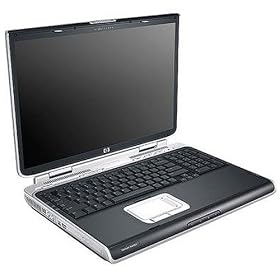
HP Pavilion zd8230us


Take your entertainment center with you wherever you roam with the HP Pavilion zd8230us Media Center notebook PC. Record your favorite TV programs and watch them--via the included HP Dual TV Tuner--on the widescreen 17-inch LCD monitor, view photo slideshows with your own soundtrack, or watch DVD movies, and control it all with the included remote. The zd8230us can also unleash your digital creativity with the multiformat, LightScribe DVD/CD burner with dual layer support and included Image Zone photo editing and management software. This multimedia notebook features a super-fast, hyper-threaded 3.4 GHz Pentium 4 650 processor, 100 GB hard drive, 1 GB of installed RAM, 54g wireless connectivity with 125HSM SpeedBooster support, multiformat memory card reader, a powerful video/graphics card with 128 MB of dedicated RAM, and Bluetooth wireless capability (for connecting to compatible PDAs, cell phones, printers, and more).
HP Pavilion zd8230us 17" Notebook PC (Intel Pentium 4 Processor 650 (H-T), 1024 MB RAM, 100 GB Hard Drive, LightScribe DVD+/-RW and CD-RW Combo Drive) Price: $2,439.99

How do I know if my laptop battery is likely to explode?

Rechargeable batteries in today's consumer electronics are made of lithium ion, an extremely energy-dense substance -- it's what gives us a lot of power in a lightweight, compact form factor.

That same energy density, however, makes the batteries more prone to combustion if they've been damaged or if there is a fault in the manufacturing process.

There are some tips you can follow to make sure your battery is in good condition: keep it from getting too hot, inspect it regularly for dents or damage, and handle it carefully. Most importantly, keep an eye out for battery recalls, because those are indicative of possible defects in manufacturing.
Answer by:
Michelle Thatcher, CNET.com